

What We’ll Cover in This Article
- Why office print hasn’t disappeared (and why it still matters)
- How printed documents fit into modern digital workflows
- Practical examples of indexing, access, and security gains
- ROI considerations for balancing digital and print
- Questions leaders should ask when assessing print strategy
Introduction: So…Is Print Really Dead?
Every few years, someone declares the “death of print.” Yet if you look around your office—or your clients’ offices—you’ll still see printed documents in daily use. The truth is not that print died. It evolved.
Printed materials have shifted from “everything goes on paper” to strategic, high-value uses: legal records, annotated work packets, patient forms, executive summaries, branded proposals. Instead of competing with digital workflows, print now complements them. The organizations that thrive are those that integrate print into secure, indexed, and quickly retrievable document ecosystems.
Why Print Didn’t Disappear in the Digital Shift
1. Human factors: Comprehension and trust
Research shows that many people still retain information better from paper than screens, especially for long or complex content (e.g., legal contracts, technical drawings). In meetings, a well-laid-out printed packet still carries authority.
2. Regulatory and compliance drivers
Industries like healthcare, law, and finance often require hard copies for retention or compliance. Digital records are essential, but physical copies are still trusted for audits, client confidence, and redundancy .
3. Hybrid work realities
Remote teams rely on digital files, but offices still need shared devices for signed documents, physical notices, and customer-facing materials. Hybrid models demand secure, right-sized print fleets that align with digital workflows .
How Print Has Evolved Into a Strategic Role
Print management and automation
Managed Print Services (MPS) standardizes devices, automates supplies, and enables secure print/pull release. This reduces wasted prints and strengthens confidentiality .
Doceo Pro Tip: Secure print/pull release isn’t just about reducing unclaimed pages. It’s about keeping sensitive client information from sitting unprotected on trays.
Workflow integration
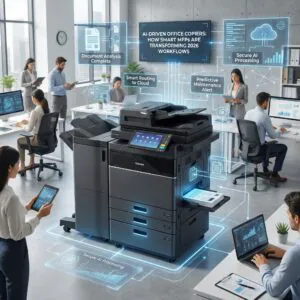
Today’s printers are multifunction devices (MFPs). They’re not just output machines—they’re gateways into digital workflows. Scanning directly into document management systems with consistent naming conventions makes retrieval far easier than digging through email chains.
Indexing and quick access
Software like PaperCut enables indexing and reporting. Leaders can see which departments print most, apply rules (like default duplex), and reduce spend—all while making records searchable and auditable .
Doceo Pro Tip: Pair scanning workflows with index templates (e.g., client ID + date). It reduces errors and accelerates retrieval across teams.
ROI: Print as a Cost Center or Value Driver?
Let’s do some simple math.
- Baseline: An office of 100 employees prints ~4,000 pages/month at $0.06/page = $240/month.
- With secure release + duplex defaults: volume drops ~25% (to 3,000 pages).
- New run-rate = $180/month. Annualized, that’s a $720 savings—without reducing effectiveness.
Multiply those numbers across multiple devices, or factor in fewer service calls from right-sized fleets, and the value becomes obvious .
Questions Leaders Should Be Asking
- How are our devices secured and monitored?
- Do we have the right mix of A3 (ledger-capable) and A4 (letter/legal) devices?
- What percentage of our prints are unclaimed or waste?
- Can we search, retrieve, and index documents as easily as we print them?
- Are our print policies aligned with compliance requirements?
Asking these questions reframes print not as a legacy cost, but as a strategic asset in your organization’s information ecosystem.
FAQs About Modern Print
What does managed print actually include?
Standardized devices, supplies automation, secure release, proactive service, and cost tracking .
How does secure print work?
Users authenticate at the device to release jobs—reducing unclaimed prints and protecting sensitive data .
How do we measure print costs?
Print management tools like PaperCut report cost per page, device utilization, and waste, making cost control actionable .
Conclusion: Print Is Here—Just Smarter
Print isn’t extinct. It’s evolved into a leaner, smarter, and more secure part of the office. By pairing modern print technology with digital workflows, leaders gain the best of both worlds: paper where it adds value, and digital where it accelerates access.
👋
Frequently Asked Questions About Print in the Modern Office
Why does print still matter in offices that rely heavily on digital tools?
Print remains valuable because certain tasks are simply done better on paper – contract review, detailed reference documents, client presentations, and anything that benefits from annotation or physical handling. Studies in cognitive research consistently show that reading on paper improves retention and comprehension for complex material, which is why so many professionals print documents they need to think carefully about. Going fully digital makes sense for some workflows, but for many offices, a balanced approach that includes intentional printing produces better outcomes than one that treats paper as inherently wasteful.
What is the difference between going paperless and going print-smart?
Going paperless means eliminating print entirely, which is impractical for most offices and often creates friction in workflows that genuinely benefit from physical documents. Going print-smart means being deliberate about what gets printed, by whom, and on which devices – reducing waste without sacrificing the value that print provides. A print-smart office uses managed print services, secure print release, and usage tracking to ensure every page printed has a purpose. The result is typically lower costs, less waste, and a print environment that supports the work rather than complicating it.
How does managed print services (MPS) reduce costs for offices?
Managed print services consolidates your print environment under a single provider who monitors device performance, handles supplies replenishment, and optimizes the placement of equipment across your office. By replacing a mix of aging, inefficient printers with a rationalized fleet, MPS typically reduces the per-page cost of printing and cuts down on the hidden costs of self-managed devices – like emergency toner purchases, reactive repairs, and staff time spent troubleshooting equipment. Doceo structures MPS engagements around real usage data so clients are not paying for capacity they do not need.
What are the security benefits of managed printing?
Unmanaged print environments create real security risks: documents left uncollected in output trays, shared printers with no user authentication, and devices that store print jobs in unencrypted memory. Managed printing addresses these risks through secure print release (jobs print only when the user authenticates at the device), access controls that limit who can print what, and audit trails that record print activity by user and department. For offices in healthcare, finance, legal, or any field with confidentiality requirements, these controls are an important part of a broader data security posture.
How do I know if my office has the right number and type of print devices?
Most offices either have too many devices – particularly aging desktop printers that are expensive to maintain – or have their devices poorly positioned for actual workflows. A right-sizing assessment looks at your current fleet, actual monthly volumes by department, document types, and physical layout to recommend a configuration that matches how your team actually works. Doceo conducts these assessments as part of its managed print engagements, and the findings often reveal straightforward changes that reduce costs and improve day-to-day convenience without requiring a full fleet replacement.
Have questions or want to talk through your options? We’re here to help. Chat with a Doceo Print Technology Advisor today: Let's Talk